The Aadhaar card is a 12-digit unique identification number issued by UIDAI and serves as a vital document for accessing various government schemes and financial services. Keeping track of your Aadhaar enrolment or update status is important to avoid any disruption in availing these benefits.
This article offers a comprehensive guide explaining the significance, step-by-step process, and simple methods to check your Aadhaar card status both online and offline quickly and conveniently.
Aadhaar Enrolment & Update Status
Check your Aadhaar enrolment status and track updates.
Enrolment & Update Status
Track your Aadhaar enrolment or update progress in real-time.
Aadhaar Enrolment Status: Once you complete your enrolment at an Aadhaar Seva Kendra (ASK) or Permanent Enrolment Centre (PEC), you will receive a 28-digit Enrolment ID (EID) on your acknowledgement slip. This EID allows you to track your application and confirm whether your Aadhaar number has been issued. The enrolment process usually takes 10 to 90 days.
Aadhaar Update Status: If you apply to update your Aadhaar details—such as your name, address, mobile number, or biometric information—either online or at a centre, you will be given an Update Request Number (URN) or EID. By checking the update status, you can ensure that the requested changes have been successfully processed. Updates generally take 10 to 30 days.
Both enrolment and update status checks are free of charge. UIDAI provides multiple secure options, including its official website, mobile application, and SMS service, to help you track your Aadhaar Card status conveniently.
Requirements to Check Aadhaar Card Status Online
- Keep your 28-digit Enrolment ID (EID) or Update Request Number (URN) handy, which you receive after completing Aadhaar enrolment or requesting an update.
- Ensure your mobile number is registered with Aadhaar to receive the OTP for verification.
- To check the status online, you should have access to a smartphone, laptop, or desktop computer.
- A reliable internet connection is required when using the UIDAI website or mobile application.
- For tracking status via SMS, your mobile number must be linked to your Aadhaar.
- Safely preserve your acknowledgement slip, as it contains essential reference information.
- Always enter accurate details while checking your status to prevent errors or delays.
Different Ways to Verify Aadhaar Enrolment & Update Status
After completing your Aadhaar enrolment or submitting an update request, you can easily track the Aadhaar Card Status of your application using the following methods:
Method 1: Through the UIDAI Website (myAadhaar Portal)
The myAadhaar portal is the official platform for checking both enrolment and update status.
- Visit the official website: myaadhaar.uidai.gov.in
- Click on the “Check Enrolment or Update Status” option.
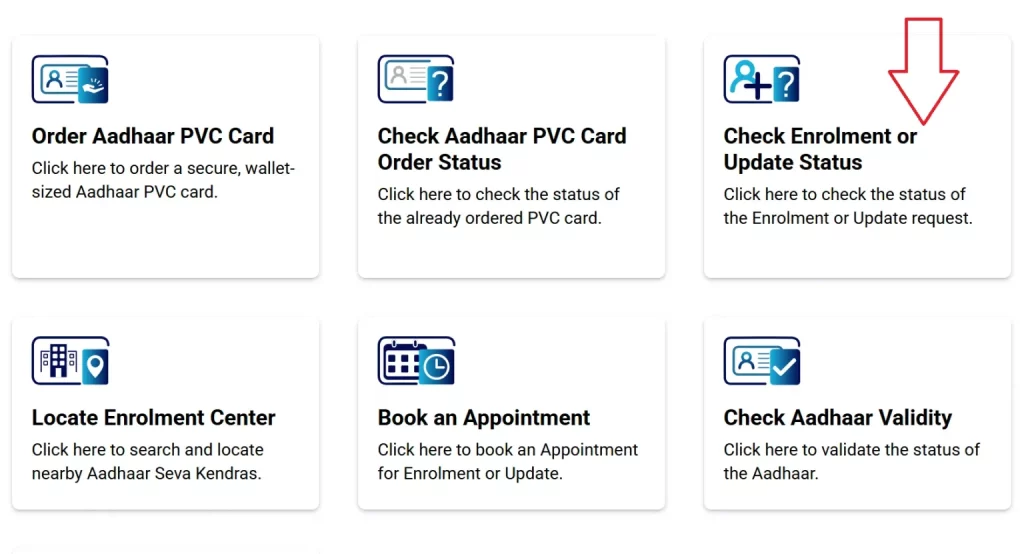
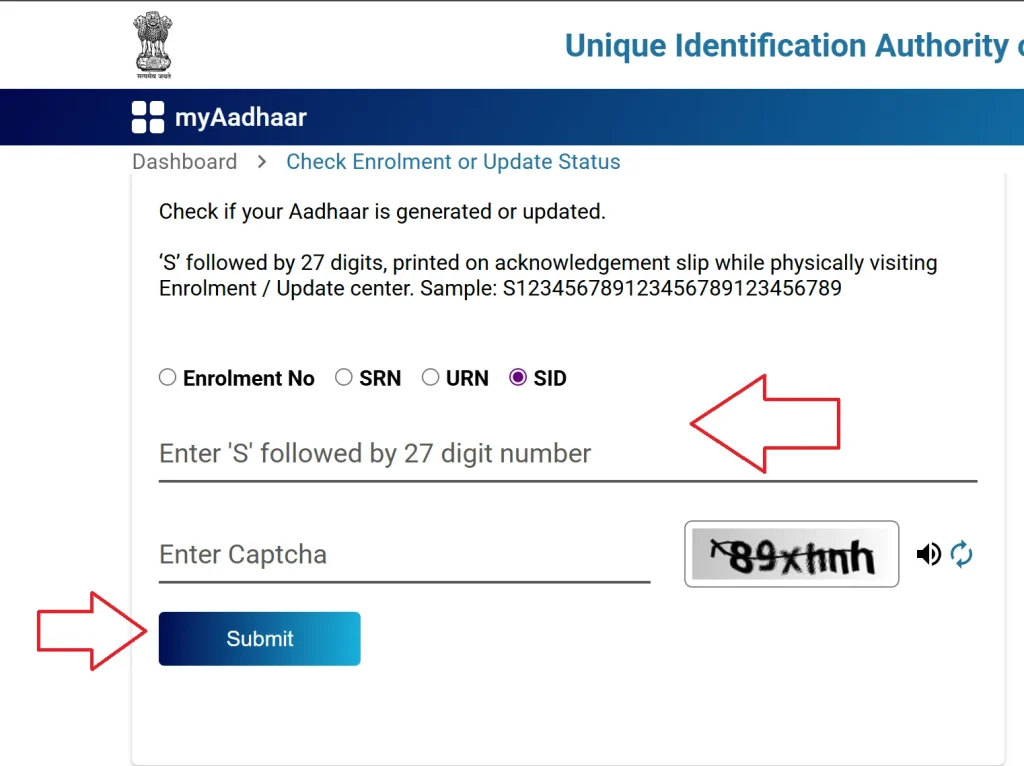
- Enter your Enrolment Number (EID) / SRN / URN / SID as mentioned on your acknowledgement slip.
- Fill in the captcha code and click on “Submit” to view your application status.
Processing Time: Aadhaar generation usually takes between 10 and 90 days. If your mobile number or email ID is registered, you will receive a notification via SMS or email once it is ready.
Method 2: mAadhaar App
The mAadhaar app, available on both the Google Play Store and Apple App Store, offers a simple and convenient way to check your Aadhaar enrolment or update status directly from your smartphone.
- Download and install the mAadhaar app.
- Open the app and select your preferred language.
- From the main menu, tap on “Enrolment & Update Status.”
- Click on “Check Status” to track your application progress.
If your Aadhaar has been generated:
- Log in using the OTP sent to your registered mobile number.
- e-Aadhaar Download PDF or view your Aadhaar details within the app.
Method 3: UMANG App
Aadhaar services are conveniently integrated into the UMANG app, along with various other government services.
- Download the UMANG app from the Google Play Store or Apple App Store, or visit web.umang.gov.in.
- Register and log in using your mobile number.
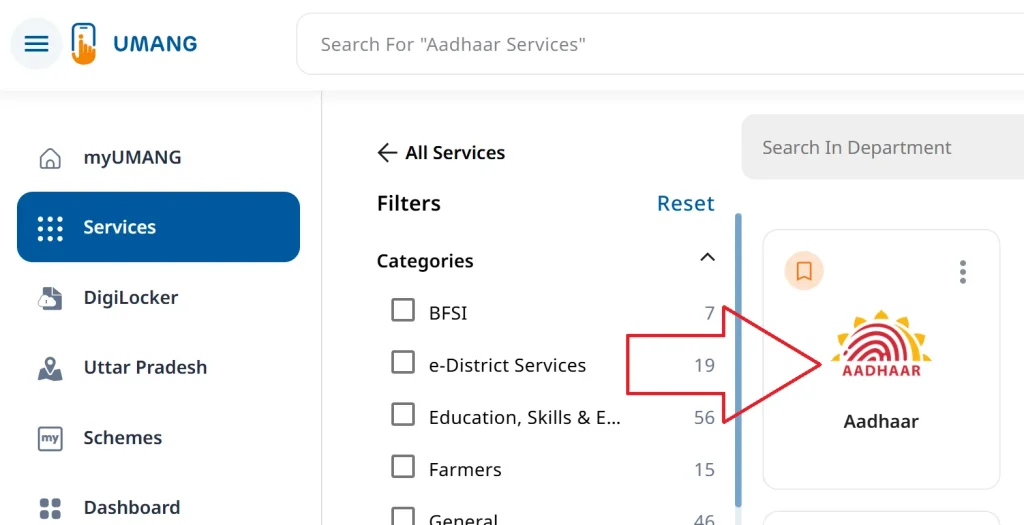
- Go to “All Services” and select “Aadhaar.”
- Choose “Check Enrolment & Update Status.”
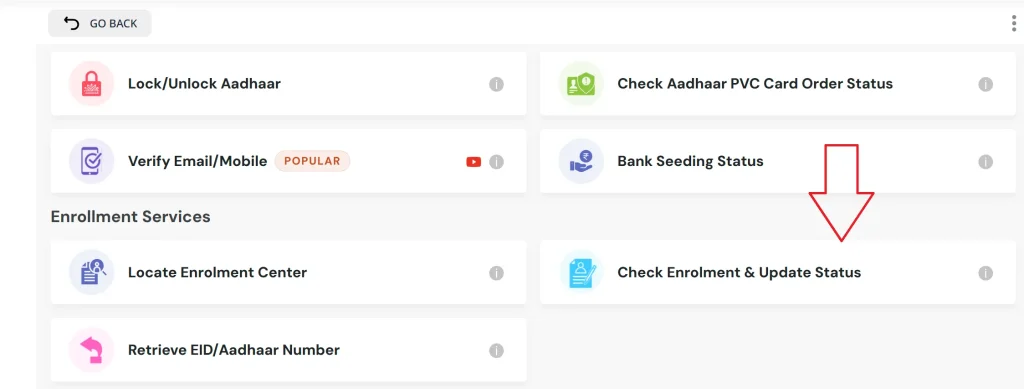
- Enter your 28-digit Enrolment ID (EID) and the captcha code.
- Click on “Submit” to view your current status.
Method 4: Call On TollFree Number of MY Aadhaar
You can also track your Aadhaar enrolment status by calling the UIDAI toll-free helpline number 1947 from your registered mobile number. Follow the Interactive Voice Response (IVR) instructions: press 1 for the enrolment and update status option, enter your Enrolment ID (EID) when prompted, and the system will provide you with your current status.
How to Retrieve Aadhaar Number / EID / SID?
If you have misplaced your acknowledgement slip, you can easily recover your Aadhaar number or EID/SID by following these steps:
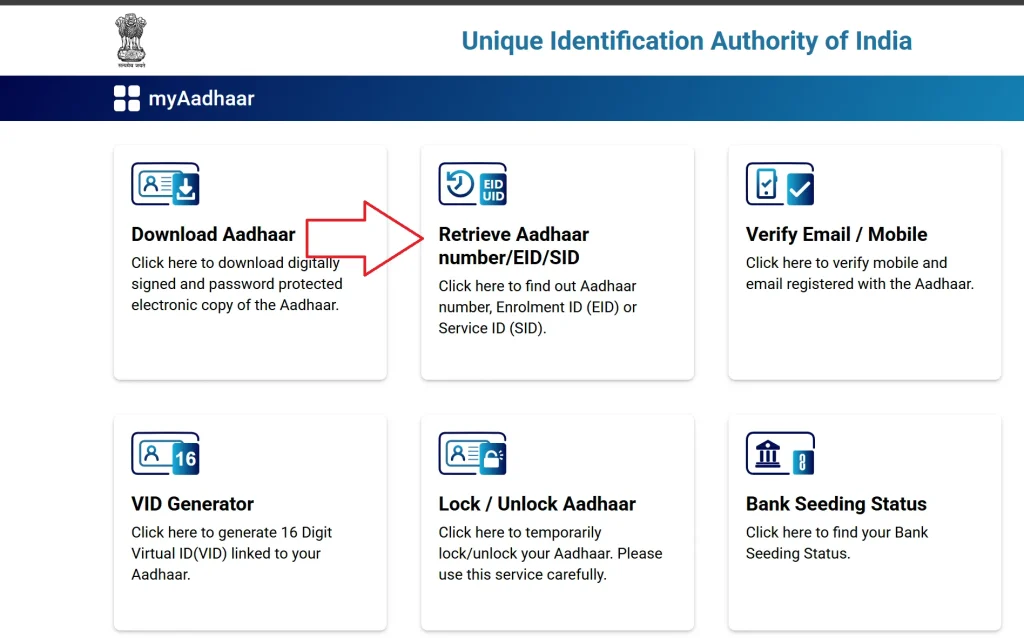
- Visit myaadhaar.uidai.gov.in and click on “Retrieve EID/Aadhaar Number.”
- Enter the required details along with your registered mobile number or email ID, and complete the captcha verification.
- Request an OTP and verify it to confirm your identity.
- Once verified, your EID or Aadhaar number will be sent to you via SMS or email.
You can then use the retrieved EID to check your status or download your e-Aadhaar.
FAQs on Aadhaar Card Status Online
| What is an Enrolment ID (EID)? The Enrolment ID (EID) is a 28-digit number printed on the acknowledgement slip provided after completing Aadhaar enrolment. It is used to track the status of your application. |
| What is an Enrolment ID (EID)? The Enrolment ID (EID) is a 28-digit number printed on the acknowledgement slip provided after completing Aadhaar enrolment. It is used to track the status of your application. |
| How long does it take to generate an Aadhaar number? You can track your update status using the URN or EID on the UIDAI website, through the mAadhaar or UMANG app, or by calling the toll-free helpline number 1947. |
| What Should I do if I Lose My Acknowledgement Slip? If your acknowledgement slip is lost, you can retrieve your EID or Aadhaar number online at myaadhaar.uidai.gov.in using your registered mobile number or email ID. |